Docker
Manage containers, images, networks, volumes, Compose, and system prune — keyboard-first.
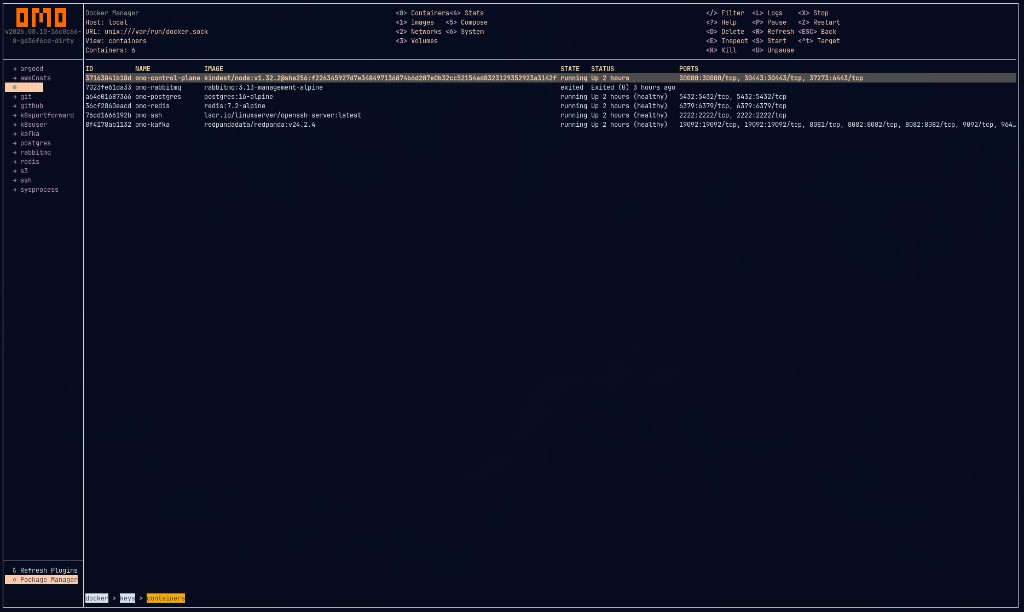
Container table with name, image, state, status, and ports.
KeePass
Path: docker/<env>/<host>
| Field |
Meaning |
| URL |
Docker host (unix:///var/run/docker.sock, tcp://host:2376) |
cert_path |
TLS certificates directory |
tls |
"true" enable TLS |
tls_verify |
"true" verify TLS |
tags |
tags |
omo secrets put docker/development/local \
  --url unix:///var/run/docker.sock
Uses the Docker Engine API (SDK). Compose / some helpers may still invoke the Docker CLI when present.
Views
| Key |
View |
| 0 |
Containers |
| 1 |
Images |
| 2 |
Networks |
| 3 |
Volumes |
| 4 |
Stats |
| 5 |
Compose |
| 6 |
System |
Actions
Containers
| Key |
Action |
| ++S++ |
Start |
| ++X++ |
Stop |
| ++D++ |
Delete |
| ++L++ |
Logs |
| ++E++ |
Inspect |
| ++P++ |
Pause |
| ++U++ |
Unpause |
| ++K++ |
Kill |
| ++Z++ |
Restart |
Images
| Key |
Action |
| ++D++ |
Delete |
| ++P++ |
Pull |
| ++H++ |
History |
| ++U++ |
Run |
| ++E++ |
Inspect |
Networks / Volumes
| Key |
Action |
| ++D++ |
Delete |
| ++E++ |
Inspect |
| ++P++ |
Prune (volumes) |
Compose
| Key |
Action |
| ++U++ |
Up |
| ++D++ |
Down |
| ++S++ |
Stop |
| ++Z++ |
Restart |
| ++L++ |
Logs |
System
| Key |
Action |
| ++P++ |
Prune all |
| ++D++ |
Disk usage |
| ++E++ |
Events |
Troubleshooting
- Ensure the Docker daemon is running
- Check socket permissions for the URL you configured
- Confirm API access (e.g.
docker version if CLI is installed)
containers · devops · infrastructure