Navigation & Shortcuts
omo is keyboard-first. Shortcuts are always visible in the header / actions column, and ++?++ opens contextual help.
Layout
 header (full width): Info | Views | Actions | logo
┌────────────┬────────────────────────────────────────────┐
│ Plugins    │  Main view (table / logs / dashboard)      │
│            │                                            │
└────────────┴────────────────────────────────────────────┘
 [Plugins][View]   breadcrumbs   version   D p i t
- Left: installed plugins
- Center: current plugin view (or host dashboard)
- Header: connection info (
Plugin:key), numbered views, actions, OMO mark - Footer: Plugins/View tabs, breadcrumbs, version, host shortcuts (
Dpit)
Global (host)
| Key | Action |
|---|---|
| Tab / Shift+Tab | Cycle focus (plugins ↔ main ↔ actions); inside a modal, move between its fields/buttons only |
| Up / Down | Move selection |
| Enter | Activate |
| R | Refresh plugins (plugins list focused) |
| ++D++ | Dashboard (plugins list focused) |
| P | Open Package Manager (plugins list focused) |
| I | Open Settings / Info (plugins list focused) |
| T | Themes (plugins list focused) |
Inside a plugin
| Key | Action |
|---|---|
| Ctrl+T | Switch target / connection |
| ++R++ | Refresh view |
| ++/++ | Filter rows |
| ++?++ | Help (plugin + global bindings) |
| Esc | Back / home / dismiss modal |
Digit keys 0–9 switch primary views when the plugin defines them. Plugin-specific actions appear in the actions column and in ?.
Modals
When a modal is open, Tab stays inside it — you cannot accidentally jump to the plugin rail until you dismiss with Esc or confirm.
Logs view
Some actions (e.g. Docker logs) open the shared in-place logs view:
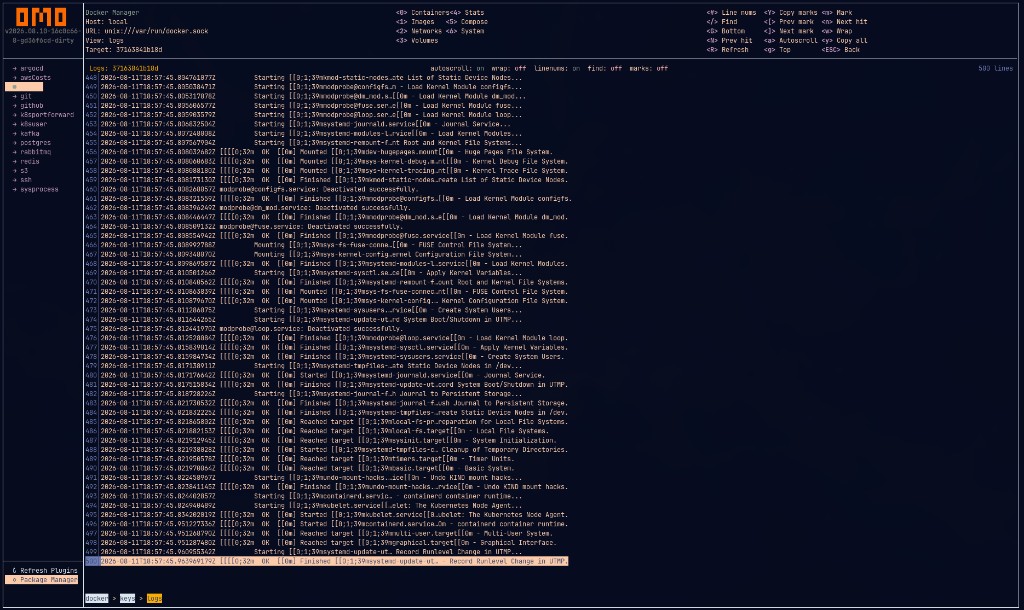
Wrap, find, marks, and copy — shared across plugins.
See the full Keyboard Cheatsheet.