Package Manager
Install and update official plugins without leaving the TUI.
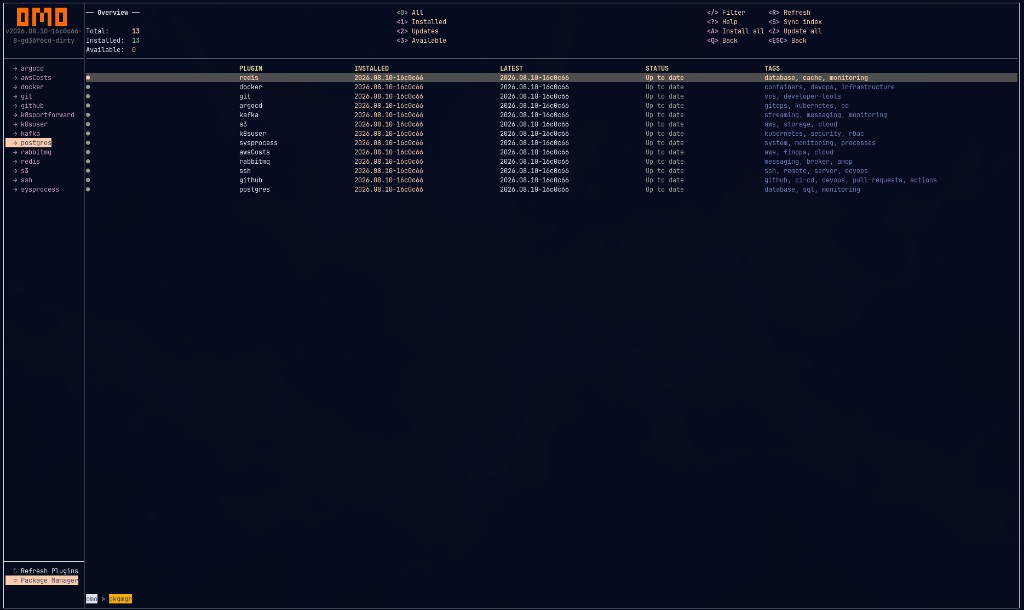
Sync the index, install, and update plugins without leaving the TUI.
Open
With the plugins list focused, press P. Host shortcuts (++D++ dashboard, P packages, I info, T themes) only fire while the rail is focused.
Views
| Key | View |
|---|---|
| 0 | All |
| 1 | Installed |
| 2 | Updates |
| 3 | Available |
Actions
| Key | Action |
|---|---|
| ++I++ | Install selected |
| ++U++ | Update selected |
| ++D++ | Remove selected |
| ++S++ | Sync index from GitHub |
| ++A++ | Install all |
| ++Z++ | Update all |
| ++Q++ | Back |
| ++R++ | Refresh list |
| ++/++ | Filter / search |
| ++?++ | Help |
| Esc | Back |
Source: internal/packagemanager/packagemanager.go.
What gets written
| File | Role |
|---|---|
~/.omo/index.yaml |
Remote catalog (synced) |
~/.omo/installed.yaml |
What you have installed |
~/.omo/plugins/<name>/<binary> |
Plugin executable |
Plugin metadata in-repo: plugins.meta.yaml. Published index: index.yaml.
Tips
- Sync (++S++) before install so you get the latest versions and tags
- After a host upgrade, re-sync and update plugins (++Z++ or ++U++)
- Review third-party plugin source before installing